
I’ve been building my own harness since the Claude Opus 4.8 period. For a while the coding agent kept failing to follow the orchestration logic it had committed to. That made me ask whether I should stop trusting the agent to follow that logic and own it myself, in a layer around the agent. Each entry in this series is a log of something I built (or broke) in that harness, and a place to share my thought process. This is not a tutorial, because nothing is settled in this era and I don’t have much to teach. These are just a few observations that keep showing up behind my decisions.
0. What I mean by “harness”#
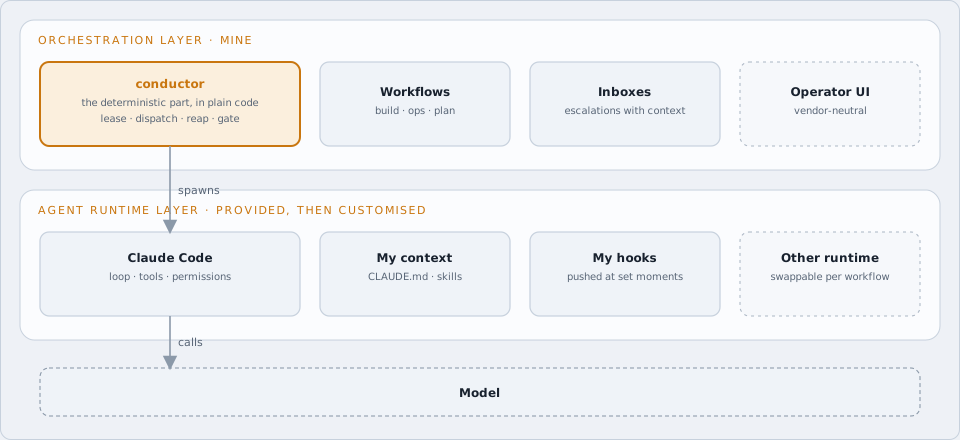
A harness is not one program. It is a stack of layers around the model, and I work in more than one of them.
- Agent runtime layer: the loop, tools, permissions and hooks wrapped around a model. Claude Code provides this, but I don’t use it as shipped. I inject my own context, skills and hooks into it.
- Orchestration layer: dispatch, workflows, gates and inboxes, which turn a rough ticket into finished work. This is where my working project, conductor, lives. I built it to pull the deterministic part of the harness out into plain code, so the model isn’t trusted with it. It is only one piece of the layer.
When I say “my harness”, I mean the whole stack, including the parts I customise rather than write. Where it matters I’ll say “agent runtime” or “orchestration” for a specific layer.
1. A harness is a personal thing#
There is no single correct way to build a harness. The model and the context are the two big variables. Budgets and model access differ between people, so even the model choice isn’t the same for everyone. Most of the flexibility comes from when and how context gets injected into the model. Some people want it loaded up front. Some want it pulled in lazily by a skill. Some want it pushed by a hook at a specific moment in the workflow. Timing matters as much as mechanism: research tasks are usually frontloaded, while development is iterative and some context only needs to land in the middle of a long session. The right answer depends on your workflow, the type of task, and honestly your own taste.
So I won’t pretend my setup is the reference implementation. It’s mine, and it fits how I work.
That said, “personal” is not the same as “anything goes”. Some structures have been tested with real experiments: a task tracker as the spine, planning separated from implementation, isolated workspaces per task, code (not the model) enforcing the safety rules. Where someone has done the rigorous testing, I’d rather follow that structure and customise at the edges than reinvent it from zero.
2. Attention is the scarce resource#
Compute is cheap now. Code is cheap now. My attention is not.
Looking back, my harness grew in roughly three stages:
- Automated build. Agents write the code, open the PR, address the review. Planning is still manual here: I grill the idea with an agent myself before anything gets built.
- Automated ops. Agents deploy, watch, recover, and triage failures. This includes data ops, like backfilling and recovering from data bugs, and devops, like deploying new apps and infra. At first I still had to start a new Claude session by hand for each of these. Now another agent process triggers it or hands it off.
- Partially automated planning. Agents turn a rough idea into a spec and a set of tickets, and only escalate the decisions that are genuinely mine. This one is still a pilot.
Here’s conductor’s run view at this point, the screen where I watch all of this. Every row is a run of some workflow (implementation, ops, triage, recovery), and I mostly don’t need to look at it.
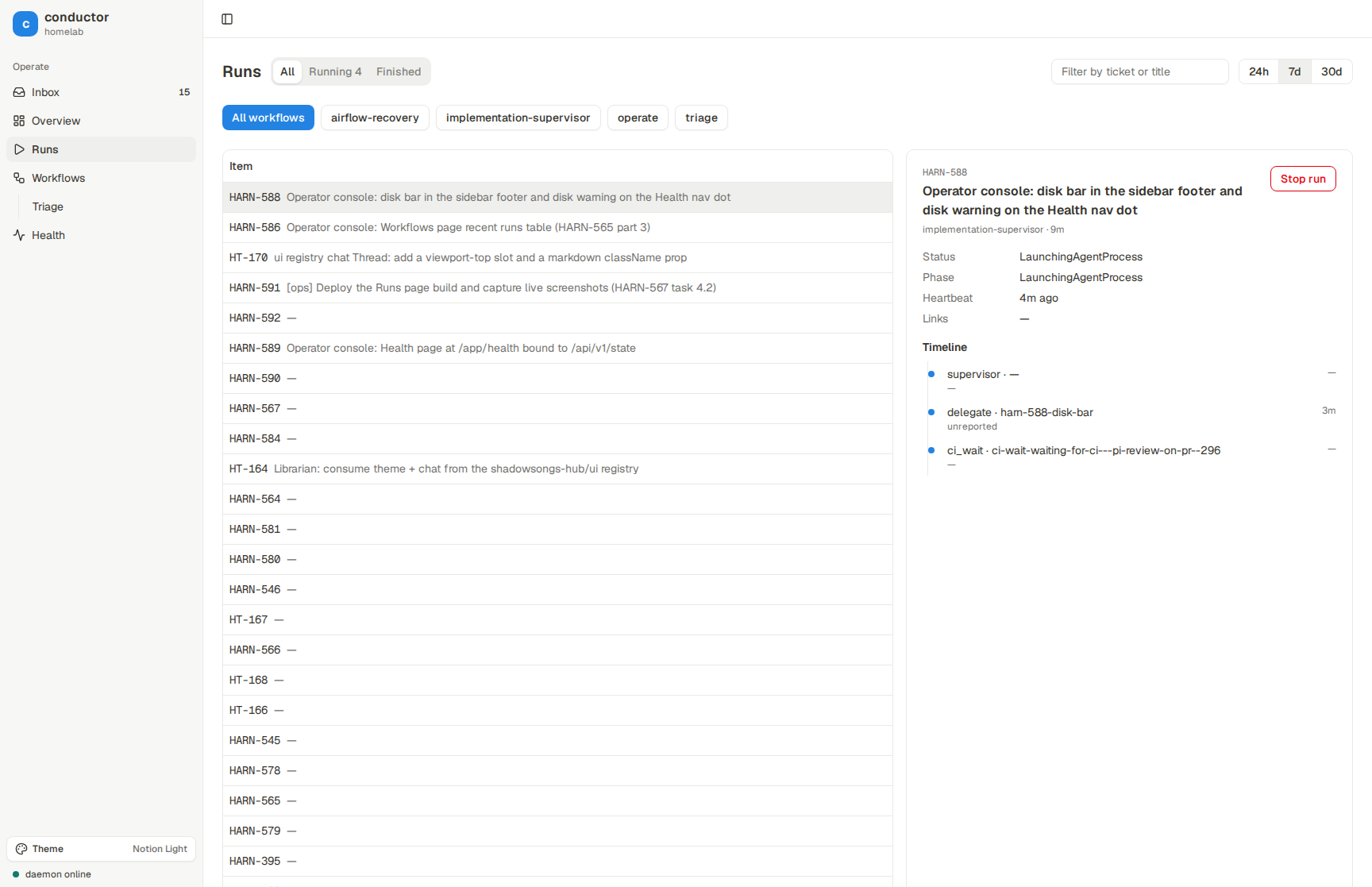
Each stage moved my attention one level up. But it never happens automatically. Every so often I have to stop, look back at what I’m still doing by hand, and ask: can this be automated now?
I don’t do this often, and I think it’s the hardest part. It’s hard to know what can be automated, and sometimes I can’t know until I try. Then I need a proper pilot with a proper evaluation, otherwise I’m just trusting a feeling.
Last night I did one of these investigations on planning. Across 260 planning sessions, about 60% of the agent’s recommended answers were accepted and 40% were rejected. That turns a vague question (“can planning be automated?”) into a narrower one: what do the accepted answers have in common, and which kinds of decision are the ones I keep overriding? The patterns that are consistently accepted are the candidates to automate. The rest stay with me.
The usual objection is “premature optimisation”. I don’t buy it here, for two reasons. The main one is that the cost of optimising has dropped drastically. Automating a chore used to be a project, and now an agent can do much of it, so the break-even point arrives much sooner. The second is scale. The codebase (and the number of agents working on it) keeps growing, so anything I do manually today, I’ll be doing ten times more often in a few months. Optimising it now is not premature, it’s just on time.
3. UX is the key to everything#
This connects directly to #2. When I say UX I don’t just mean the UI of a client-facing app. I mean the experience of operating the agentic system: how much attention each interaction costs me, and how much of it is wasted on friction.
A recent example. My agents raise escalations when they hit something they can’t or shouldn’t decide alone. Before, handling one looked like this:
- Find the ticket number from a notification.
- Open a terminal and start a Claude session.
- Type a few lines to get it to gather the context: ticket, PR, logs, what the agent was stuck on.
- Only then start actually thinking about the decision.
Steps 1 to 3 are pure attention tax. None of it is the decision itself.
So I built an email-style inbox. Escalations land there one by one. Each one already has its context attached, and resolving it is a button click. I go through them top to bottom like clearing mail.
The difference is bigger than it sounds. It’s not just faster. It’s pleasant. Clearing the inbox feels like an accomplishment instead of a chore, which means I actually do it, which means agents get unblocked sooner. Good UX on the operator side compounds through the whole system.
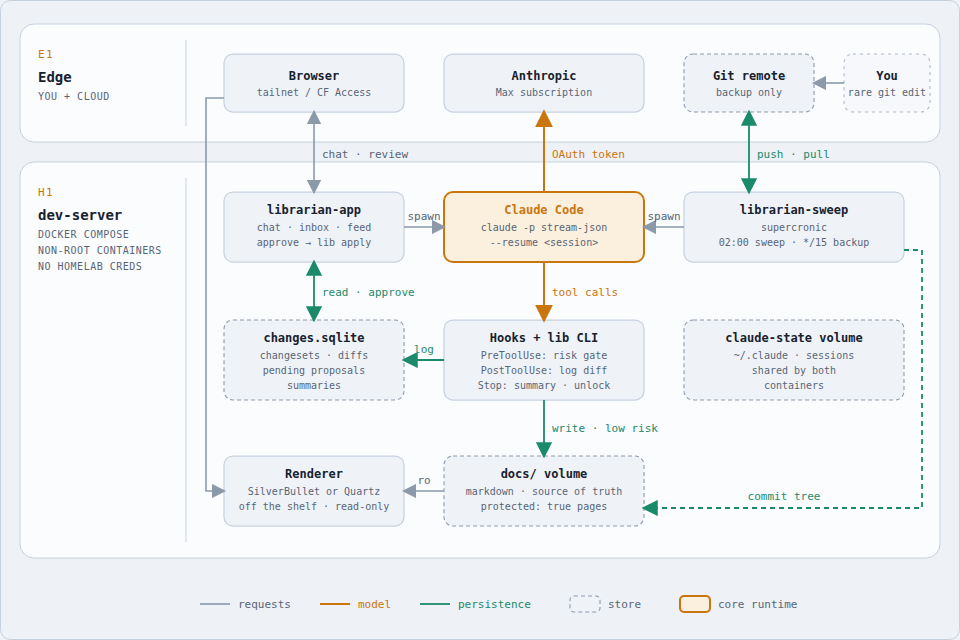
The same thinking goes into the Librarian, an agent that keeps my homelab docs up to date (this very draft was prepared within it). I read the docs in a web app, talk to the agent in a side panel, and review its changes in, again, an inbox. At the time of writing, the model decides what to change and code enforces the rules: a risk gate on every write, a diff log, and approval only for the risky edits. My attention only goes to the changes that actually need it.
4. Don’t get locked into one vendor#
Today Claude Code and the Claude models are still the strongest option for coding, and most of my harness runs on them. But I don’t think one model will rule every domain. Coding, ops, research, writing, and planning are already pulling in slightly different directions, and the leaderboard keeps reshuffling.
So the UI I operate from should not belong to any one vendor. Conductor and the inboxes are my own. Behind them, each workflow is an (agent runtime + model) pair that I can swap: Claude Code for implementation today, something else for review or a specific domain tomorrow. A custom-built operator UI over interchangeable agent runtime and model pairs is not a nice-to-have. Eventually it’s a must.
The whole thing is starting to feel like Factorio#
If you’ve played Factorio you know the loop. You hand-craft something. It gets tedious. You build a machine to craft it. Then the bottleneck moves somewhere else, so you build a belt, then a bus, then a whole factory, and eventually your job is just to watch the throughput and fix whatever is backing up.
That’s exactly what building with agents feels like now. I don’t write most of the code anymore. I customise the machines that write it, and then the machines that watch those machines, and it’s feeling like a game. My job is to spot where my attention is still being spent by hand, and automate that next.
The next entries in this series will be logs of those machines, one at a time.