Adopting Artifacts
There are two ways to get warehouse artifacts wired into your project: an interactive path through the TUI, and a declarative path through beacon.yaml. Both end in the same result — symlinks under .agentic-beacon/artifacts/ and wiring into your AI tool's config — but they're optimised for different moments.
| Path | Command | When to reach for it |
|---|---|---|
| Interactive | abc adopt |
First-time setup, discovering new artifacts a teammate added, when you'd rather pick from a list than write YAML |
| Declarative | abc sync |
After editing beacon.yaml directly, in CI, scripts, or any non-interactive workflow |
The two paths overlap deliberately: abc adopt runs abc sync automatically after a successful commit, and abc sync notifies you when new pending artifacts are available so you can switch back to the TUI.
Interactive: abc adopt
The TUI browses the warehouse, shows artifacts not yet in your beacon.yaml, and lets you select what to wire in.
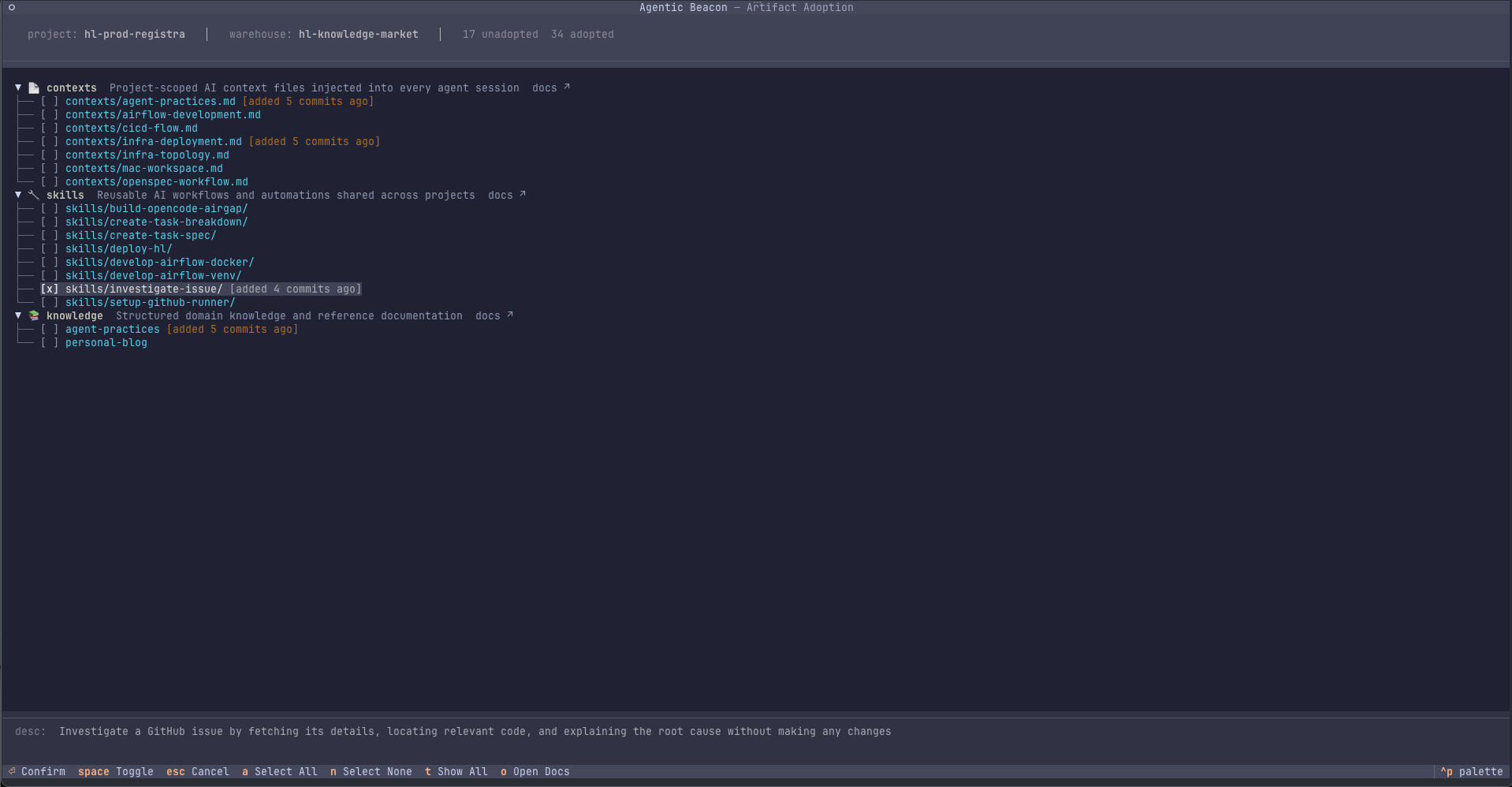
Keyboard shortcuts
| Key | Action |
|---|---|
↑ / ↓ |
Navigate the list |
Space |
Toggle selection (select / deselect) |
Enter |
Confirm selections and write to beacon.yaml |
a |
Select all visible artifacts |
n |
Deselect all visible artifacts |
t |
Toggle show-all (include already-adopted artifacts) |
Esc / q |
Cancel without making changes |
What happens on confirm
When you press Enter, abc adopt runs a single session-atomic commit:
- Selected artifacts (contexts, skills, agents) are appended to
.agentic-beacon/beacon.yaml. - Matching entries are removed from
.agentic-beacon/pending.yaml. - A full sync runs — symlinks are created under
.agentic-beacon/artifacts/. - Contexts are wired into your agent config (
CLAUDE.md/opencode.json). - Skills are installed into each detected tool's directories.
- Agents are wired into project-local
.claude/agents/and.opencode/agents/.
If any step fails, the manifests are rolled back to their pre-commit state. See Pending & Adoption for the storage model behind this.
Flags
To view your currently-adopted artifacts (or remove some), press t inside the TUI to toggle the show-all view. There is no --all CLI flag — the toggle is in-TUI only.
Editing
beacon.yamlby hand? The auto-sync described above only fires from the TUI confirm path. Runabc syncyourself afterward.
Declarative: abc sync
abc sync reads .agentic-beacon/beacon.yaml, resolves dependencies, and installs everything. This is the path you take after editing beacon.yaml directly, or in any non-interactive context (CI, scripts).
Output example:
✓ Sync complete
  Created: 5 symlinks
  Up to date: 10 symlinks
  ✓ Wired 2 context(s) into CLAUDE.md
  ✓ Installed 1 skill(s) (code-review)
What sync does
abc sync runs a multi-phase pipeline:
- Read
beacon.yaml— load declared contexts, skills, and agents. - Resolve dependencies — read
requires:frontmatter from each skill'sSKILL.mdand agent dependencies fromagents/agents.yamlto compute transitive dependencies. - Auto-derive knowledge — scan all adopted contexts and skills for markdown links to
knowledge/paths. - Create symlinks — create per-file symlinks under
.agentic-beacon/artifacts/pointing into the warehouse. - Wire artifacts — add context references to
CLAUDE.md/opencode.json, install skills into tool directories, wire agents into project-local.claude/agents/and.opencode/agents/. - Prune orphans — remove symlinks for artifacts no longer referenced.
| Artifact | Destination | Wiring |
|---|---|---|
| Contexts | .agentic-beacon/artifacts/contexts/ (symlinks) |
Added to CLAUDE.md or opencode.json |
| Skills | .agentic-beacon/artifacts/skills/ (symlinks) + tool dirs |
Installed as slash commands |
| Knowledge | .agentic-beacon/artifacts/knowledge/ (symlinks) |
Auto-derived from markdown links; no wiring needed |
| Agents | .agentic-beacon/artifacts/agents/ (symlinks) + .claude/agents/ + .opencode/agents/ |
Wired per-project; declared in beacon.yaml |
Sync flags
| Flag | Effect |
|---|---|
--dry-run |
Show what would be synced without making changes |
--force |
Force-overwrite all conflicting files, ignoring local modifications |
--verbose |
Print per-file output for each artifact processed |
--skip-git-check |
Bypass warehouse git state checks (uncommitted changes, behind remote, non-main branch) — useful in CI |
--contribute-local |
Non-interactive: contribute all locally modified files back to the warehouse during sync |
--discard-local |
Non-interactive: discard all locally modified files and replace them with fresh symlinks |
Flags compose: abc sync --force --dry-run previews a full reset.
The Discovery Loop
When a teammate pushes new artifacts to the warehouse, abc sync picks up on it:
✓ Sync complete
  Created: 0 symlinks
  Up to date: 10 symlinks

1 new artifact(s) available — run abc adopt to review
The two paths chain naturally: abc sync after a git pull notices the new pendings; abc adopt is how you actually pull them in.
Resetting and Cleaning Up
abc reset    # force-overwrite all synced artifacts from the warehouse, discarding local mods
abc clean    # remove .agentic-beacon/artifacts/ entirely (re-create with abc sync)
See Also
- Pending & Adoption — the
pending.yamlstorage model and atomic-commit guarantees - beacon.yaml Reference — direct editing reference
- Day-to-Day Workflow — how adopt + sync fit into the recurring loop
- CLI Reference — full flag documentation